
|
THE 30-SECOND VERSION ✓ Choose roll labels for a compact, self-contained setup when the printer supports the roll’s core and outside diameter. ✓ Consider fanfold labels when a larger external stack reduces replenishment and the printer has a suitable rear or bottom feed path. ✓ Keep fanfold stacks aligned, clean, and level; poor placement can cause drag, skewing, or jams. ✓ Compare total workflow—not only labels per package—before standardizing. |
TWO FORMATS, ONE BASIC PURPOSE
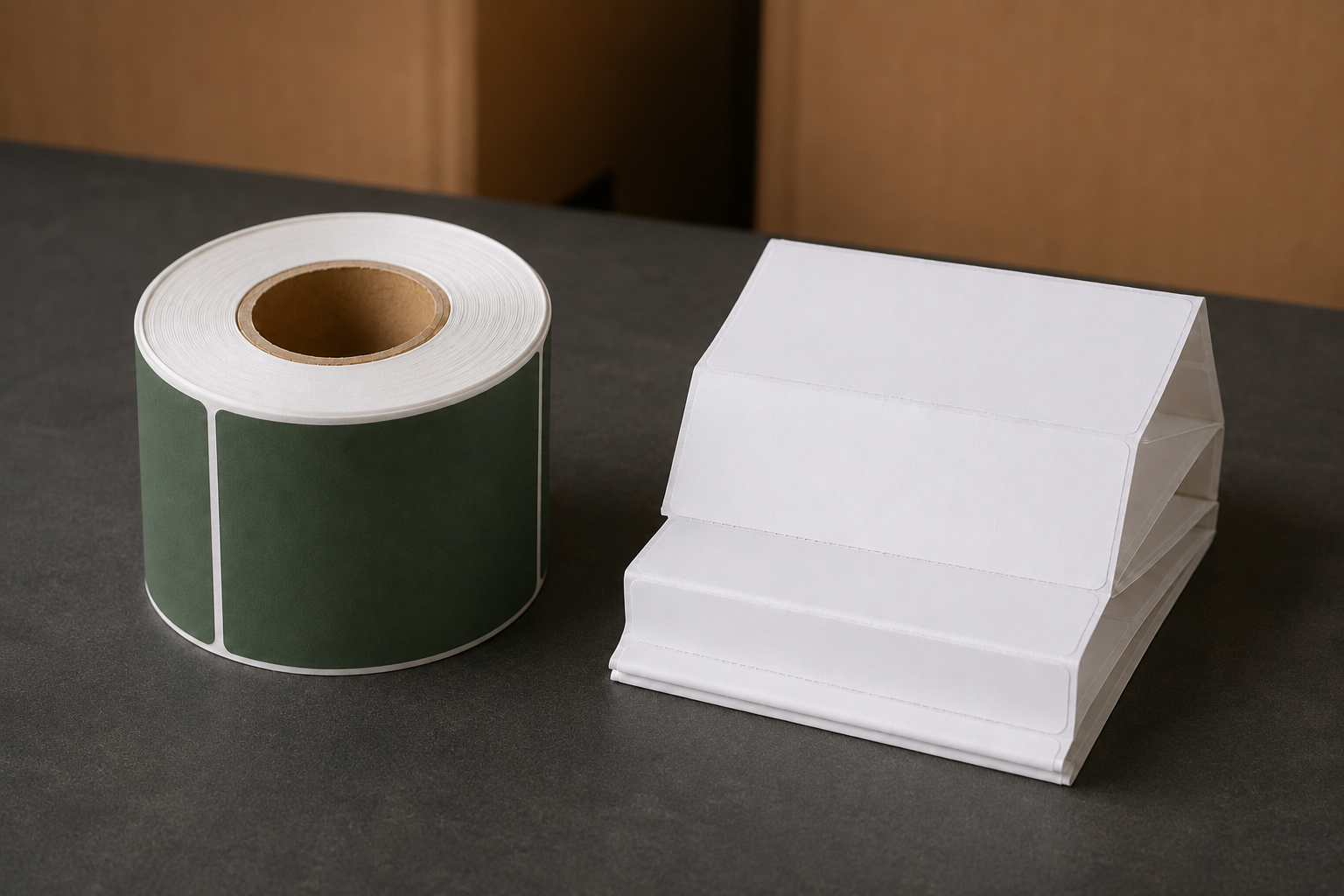
Roll and fanfold labels can carry the same types of barcodes, addresses, and operational data. The difference is how the liner is packaged and delivered into the printer. Roll media is wound around a core. Fanfold media is folded back and forth into a rectangular stack, with label separations positioned on or near the folds.
This physical difference changes where the supply sits, how often it is replenished, how much space it occupies, and how carefully the feed path must be managed. It does not, by itself, determine print method: both formats can be available for direct thermal or thermal transfer applications, depending on the product and printer.
|
Factor |
Roll labels |
Fanfold labels |
|
Media position |
Often inside printer |
External stack |
|
Footprint |
Compact printer setup |
Needs space behind or below |
|
Capacity |
Limited by roll/core fit |
Can use a larger stack |
|
Changeover |
Replace complete roll |
Replace or join planned stacks |
|
Feed control |
Core guides media |
Stack alignment is critical |
|
Portability |
Convenient self-contained supply |
Better for fixed stations |
WHERE ROLL LABELS PERFORM BEST
Rolls are usually the simplest choice when the media is designed for the printer’s internal holder. The enclosure protects the supply from dust and accidental contact, while the core helps maintain an orderly feed. This makes rolls well suited to compact desks, shipping counters, mobile carts, and stations where the printer may be moved.
The main constraint is capacity. The core and finished outside diameter must fit the printer. A small desktop roll may require more frequent changes during high-volume work. An industrial printer can often hold a larger roll, but the exact maximum varies by model.
Roll labels are usually the better fit when:
1. The printer must remain compact or portable.
2. The internal media compartment protects labels from a dusty or crowded work area.
3. Print volume is moderate or roll changes do not interrupt critical work.
4. The approved core size and outside diameter are already standardized.
WHERE FANFOLD LABELS PERFORM BEST
Fanfold media can support high-volume fixed stations because the external stack is not limited by an internal roll compartment. A larger supply may reduce replenishment frequency, and the flat packaging can be easy to store and count. It also removes core disposal from the label-loading process.
Those advantages depend on a disciplined setup. The stack must sit square to the feed slot and at the height and distance recommended by the printer manufacturer. If the stack is angled, crushed, dusty, or placed too far away, extra drag can pull labels off-center or produce inconsistent feeding.
|
☀ DID YOU KNOW? Fanfold media can use the same gap, hole, notch, black-mark, or perforation concepts as non-continuous roll media. The folds change the package format—not the printer’s need to detect label boundaries correctly. |
CHOOSE BY WORKSTATION, NOT BY PACKAGE PREFERENCE
A useful decision starts with the printer and the physical station. Walk through the actual replenishment path: where cases are stored, where the open supply sits, who changes it, and whether the printer is moved. Then compare the impact of each format on uptime and housekeeping.
|
Workstation condition |
Better starting point |
Reason |
|
Small counter or mobile cart |
Roll |
Keeps the supply contained |
|
Fixed, high-volume packing line |
Fanfold |
External capacity may reduce changes |
|
Dusty or exposed area |
Roll |
Internal compartment offers protection |
|
Limited room inside printer |
Fanfold |
Supply remains outside the enclosure |
|
Frequent printer relocation |
Roll |
No loose external stack to move |
SETUP CHECKS BEFORE SWITCHING FORMATS
5. Confirm the printer accepts the selected format and has the correct feed slot or external media path.
6. Verify label width, length, print method, sensing method, adhesive, and face stock—not just roll versus fanfold.
7. Calibrate the printer after changing media when the manufacturer’s instructions require it.
8. Run a representative batch and scan barcodes before releasing the new format across all stations.
9. Measure replenishment time, misfeeds, waste, and storage space during the trial.
|
⚠ COMMON MISTAKE Problem: placing a fanfold stack wherever space is available. ↓ Why it happens: the media appears flexible because it feeds externally. ↓ Better approach: keep the stack centered, level, and aligned with the feed path, then protect it from foot traffic, spills, dust, and crushed edges. |
CONCLUSION: THE BEST FORMAT SUPPORTS DEPENDABLE FLOW
Roll labels are often best for compact, protected, and mobile setups. Fanfold labels can be effective at fixed, high-volume stations where external capacity and fewer changes justify the additional footprint. The better format is the one that feeds consistently and fits the way the station actually operates.
Before converting, test one printer with the intended label stock under normal production conditions. A short trial exposes alignment, calibration, storage, and replenishment issues before they affect every workstation.
|
KEY TAKEAWAY Select roll or fanfold labels by printer compatibility, available space, volume, replenishment frequency, protection from contamination, and feed-path control. Format should improve uptime—not simply change how the labels arrive. |
Explore Labels
Share:
How to Choose the Right Steam Table Pan Size and Depth
How to Choose the Right Label Size, Core Size, and Roll Configuration